

Categories
Apps & Software Mac OS X

Tab key navigation shortcut not working in Safari, MacOS – Fixed

If you regularly use the tab key to navigate your web browser and it doesn’t work on Safari, here’s an easy fix for you.

  1. On your Mac, open Safari and head to the top left menu
  2. Click on Safari > Preferences
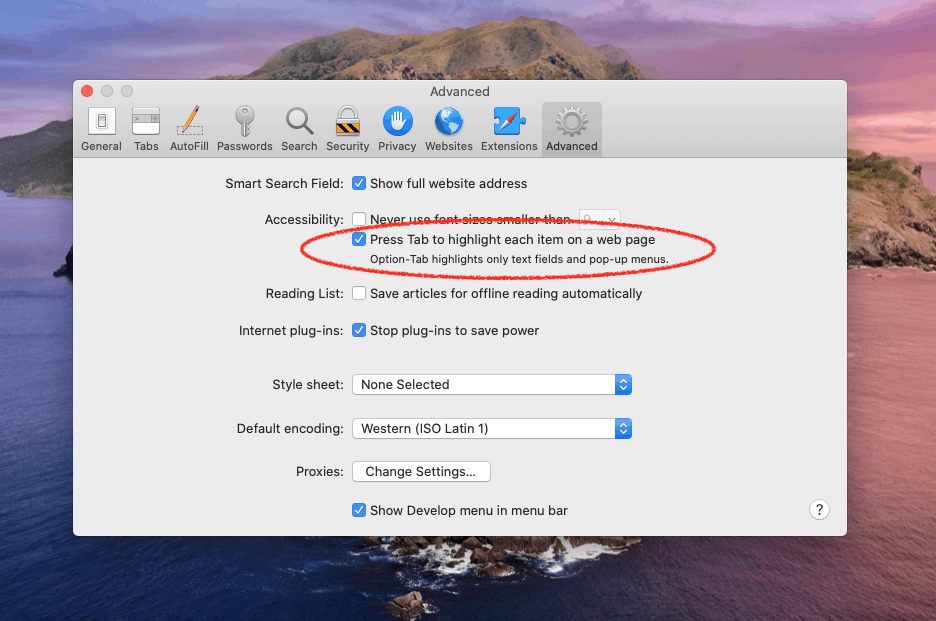
  3. In the pop-up Preferences box, click on the Advanced tab on the far-right
  4. Under the Accessibility section, click on the checkbox ‘Press Tab to highlight each item on a webpage’
  5. Close the Preferences box and voilá! You should now be able to return into keyboard ninja mode and use the tab shortcut to navigate webpages
I was so frustrated when I moved from Google Chrome to Apple’s Safari browser, only to find it wouldn’t allow me to tab between navigational elements. Having to use my mouse (until I figured out this shortcut, that is) was so cumbersome when I was in a productive flow.

Fortunately, this simple fix gets your tab key navigational shortcut fully functional.

Hope this helps, friends!

By Fabio Virgi

I'm the guy behind Let's Talk Tech and a travel blog called Fab Meets World. Some people call me a geek, I think they're probably right. I'm fascinated by technology and innovation, love good design and own way too many gadgets for my own good. Want to connect? Get in touch on Twitter and Instagram.

Kuponbet
bb marketing
betgaranti
grandpashabet
grandpashabet
grandpashabet
bahis ve casino siteleri
grandpashabet
grandpashabet
kolaybet
kolaybet
betpark
betpark
betpark
kolaybet
ikimisli
grandpashabet
grandpashabet
ikimisli
ikimisli
winxbet
ikimisli
betlike
ikimisli
yakabet
betticket
betticket
betnano
betlike
betlike
betnano
grandpashabet
betnano
betnano
grandpashabet
grandpashabet
kolaybet
İkimisli
grandpashabet
grandpashabet
grandpashabet
grandpashabet
grandpashabet
grandpashabet
restbet
ikimisli
restbet
ikimisli
ikimisli
kolaybet
kolaybet