

If you’re the type of person who’s always taking snaps with the camera of your iPhone or iDevice, then there’s probably been a time when you wanted to share some of those photos privately with friends and family. There are a few ways to do that, like sharing a Dropbox folder or tagging people on Facebook, but owning an Apple device gives you a much easier way to share those special moments; shared Photo Streams. Here’s how you can get started:

Creating A New Photo Stream
When you take a new photo, it’ll automatically show up in your main Photo Stream inside your Photos App. If you’re using iCloud, that’s the Photo Stream that synchronises all the photos you take on all of your devices.
From there, you can create separate Photo Streams for different events. All you have to do is tap ‘Edit’ on the top right of the screen, select all the photos you want, ‘Share’ and create a new Photo Stream to send the photos to.
[quote]A great perk of creating Photo Streams is that they’re accessible on all of your iDevices if you’re synced using iCloud.[/quote]
Sharing A Photo Stream
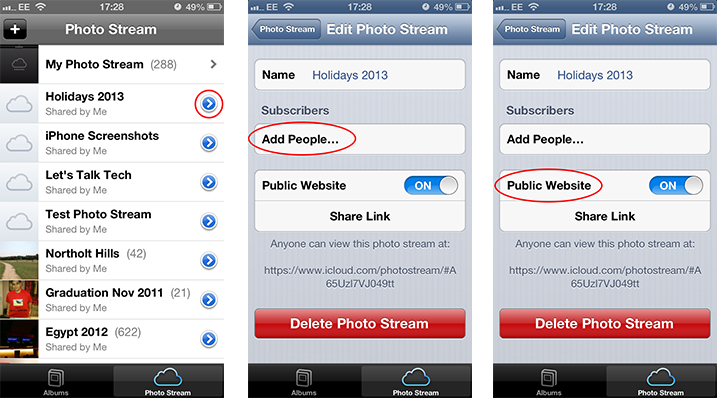
Once you’ve set up a Photo Stream with the photos you want, sharing it is really easy:
- Launch the Photos app and tap on the Photo Stream tab at the bottom
- Tap the blue button on the right hand side of your chosen Photo Stream
- Once the options appear, using the Subscribers function you can choose to privately share the album to the Photo Streams of friends and family by tapping ‘Add People’.
- If you wanted to share your chosen Photo Stream with people who don’t use iDevices, publishing the photos to a ‘Public Website’ will give you a link that you can send over.
You don’t need to worry, this ‘Public Website’ is only accessible using that link that iCloud generates for you. Only the people who you’ve given that link to will be able to see the photos and if by chance you decide to take it down, simply unpublish the photos by turning the Public Website ‘OFF’.
Making Photo Stream Social
So that you don’t miss Facebook too much, Apple integrated the social element of sharing photos by allowing you to comment and ‘Like’ individual photos as well. Although this feature is only available using the Subscribers function, it gives all users the ability to privately share their comments so instead of making it public news on social media!
Customise Your Photo Stream Using iPhoto
Using iPhoto for iOS and Mac, you can go a step further with your Public Website Photo Stream and fully customise it too. Amongst plenty of features, you can adjust the size of the images, create sections with header titles and write captions for the photos.
—
Do you already use Shared Photo Streams? What do you love or hate about it? Leave your thoughts in the comments below.
